



CALL ASSETS EXPLAINED
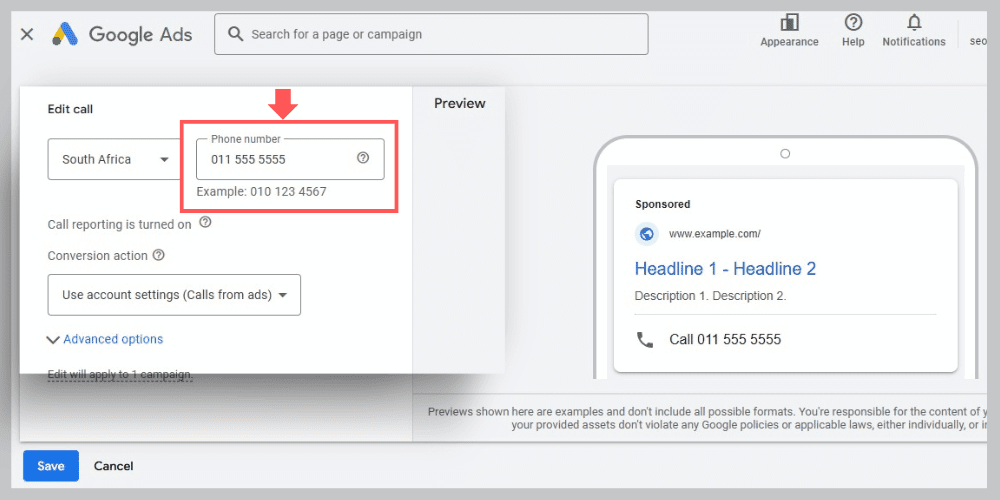

WHAT ARE CALL ASSETS
• Call Assets are Add-On features for your Adverts on Google Ads.
• Call Assets displays a phone number next to your ad, so people can call you without clicking your ad.
• Call Assets improve your clickthrough rate and conversion rate, making your ads more successful.
• Adding Call Assets to your ads improves the ranking positions for your keywords on Google Ads.

TYPES OF CALL ASSETS

CALL ASSETS FOR DESKTOP

Call Assets (displayed on Desktops) allow users to view your number for direct communication.
You cannot call directly from the advert, you can only copy the number and insert it in your phone.
Use ‘Google Forwarding Number‘ to assign a unique number to your advert.
This will track the number of people who called you from your advert.

CALL ASSETS FOR MOBILE
Call Assets (displayed on Mobiles) allow users to directly contact your business from your advert.
The user will simply click the call button and your number will automatically appear in the dial section of their phone.
Google can track the number of people who clicked this ‘call button’ to test the effectiveness of the Google Asset.

FREQUENTLY ASKED QUESTIONS

When should I use Call Assets?
They work best if you want more phone calls, especially for service-based businesses where customers prefer calling over filling out forms.
Do Call Assets only work on mobile?
They show on desktop and mobile, but the “tap to call” feature is only used on mobile devices.
Do Call Assets improve performance?
Yes! They increase engagement and boost your ad visibility because Google prefers ads that make it convenient for people to take action.
Are calls tracked in Google Ads?
Of course! Google records call metrics such as call length and number of calls. You can see how many call leads came directly from your ads.